
Nuro Audio Xrider v1.0.2 智能人声响度效果,专为提升人声表现力与整体听感清晰度而设计,能够在复杂的混音环境中自动强化人声的存在感,使演唱、对白或旁白更加突出、自然且富有层次。它不仅适用于音乐制作中的主唱优化,也非常适合播客、有声内容、影视后期以及直播音频处理中对人声稳定性和可懂度有较高要求的场景。通过对人声动态、频段分布和响度感知的智能调节,这一效果能够在不过度压缩声音细节的前提下,让人声更贴耳、更集中,同时避免刺耳或生硬的问题,使最终输出在不同播放设备上都能保持较好的清晰度与一致性。对于希望快速获得专业人声响度控制效果的创作者来说,Xrider v1..2 提供了一种兼顾效率与声音品质的实用方案。
支持系统:Windows. |
音源厂商:https://nuroaudio.com/pages/xrider |
独立安装程序 PC |
文件大小:15MB |
 |
|---|
|
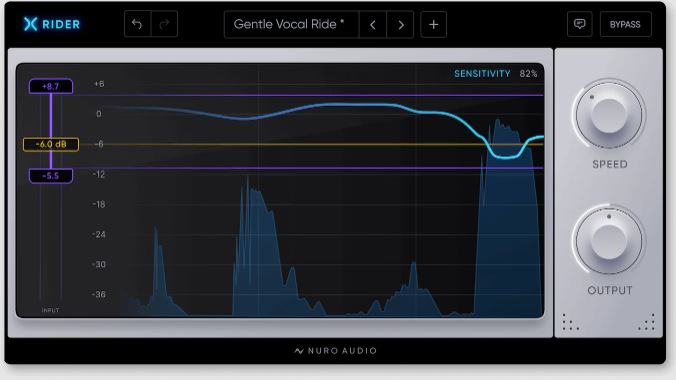
Xrider Xrider 是迄今为止功能最全面的人声电平调整插件,它能让您的人声完美融入混音。 一览无余。 了解您的目标、最小和最大设置如何与波形交互。查看 TrueGain 系列增益调整的精确历史记录。所有信息均实时显示。 设置范围 设置较小的范围作为最后的润色,或设置较大的范围,让即使是最具动态的人声表演也能完美融入您的混音中。 完全掌控 轻巧无比 得益于 Xrider 所采用的新一代音频 DSP 算法,其重量比同类 Rider 插件轻 50%。 实时零延迟 Xrider 实时执行精确到采样的增益调整,这意味着使用 Xrider 时不会增加延迟。 完全透明 与其他处理器不同,Xrider 能够完全透明地调整您的人声电平,并始终将其置于混音的首位。 内置专业预设 使用 Xrider 内置的预设,只需点击一下即可获得即时的专业效果。 为什么选择 Xrider 而不是压缩器? 如果您依赖压缩器来控制人声的所有动态,很容易导致人声过度压缩、听起来不自然。 观看此视频以了解 Xrider 和 Compressor 之间的区别 - 以及为什么应该同时使用它们。 Xrider The most versatile vocal rider plugin ever built, Xrider keeps your vocals perfectly in the mix. See Everything. See how your Target, Minimum & Maximum settings interact with your waveform. See a precise history of the gain adjustments with the TrueGain line. All in realtime. Set Your Range Set a small range for a finishing touch, or set larger ranges to keep even the most dynamic vocal performances perfectly placed in your mix. Take Complete Control Incredibly Lightweight Up to 50% lighter than comparable rider plugins thanks to the next-gen Audio DSP algorithms powering Xrider. Realtime & Zero Latency Xrider performs sample-accurate gain moves in realtime, which means no latency added when using Xrider. Completely Transparent Unlike other processors, Xrider is a completely transparent way to adjust your vocal levels and always keep them at the forefront of your mix. Pro Presets Included Get instant pro results with the included presets in Xrider, always just a click away. Why Xrider instead of Compression? If you're relying on your compressor to do all of your dynamic control for your vocal, it's easy to end up with over-compressed, unnatural sounding vocals. Watch this video to understand the differences between Xrider and your Compressor - and why you should be using both. |
评论(4)
其实配合压缩器一起用效果更好,文章里也说了。
之前混人声老是动态不稳,试试这个。
这个跟Waves的Vocal Rider比有啥优势?看介绍好像更轻量。
以前一直用压缩硬压,人声都扁了,这个自动调整确实听起来自然多了,准备在下一个项目里试试。