精简阅读
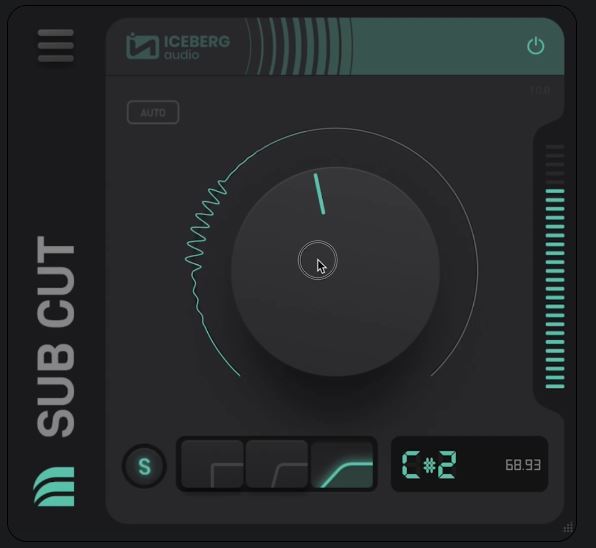
你的混音总在低频部分功亏一篑——Bass和底鼓互相撕扯,明明做了低切,声音却还是发闷。问题出在几乎所有DAW自带EQ都只提供固定曲线,而你根本不知道该切到哪个频率才能既保留能量感又不染浊。SubCut v1.1.1直接打破了这套“凭耳朵瞎猜”的逻辑,它的AUTO模式会实时跟踪音源的音调,动态调整截止点,相当于有个助理替你盯着频谱分析仪。但真正让混音师后背发凉的,是那个按音符选截止点的功能——你知道低切该从G2开始滚降吗?
— www.kbid.com.cn

Iceberg Audio 推出的 SubCut v1.1.1 是一款专为低频管理而设计的专业音频处理插件,旨在通过精准的频率切割与动态优化,帮助音频工程师和音乐制作人有效消除混音中的低频浑浊感,确保 Sub-bass 在保持震撼力度的同时拥有极高的清晰度;此次 v1.1.1 版本的更新进一步优化了算法性能并增强了系统稳定性,使其在复杂的制作环境下依然能够提供高效且纯净的低频处理方案。

支持系统:Windows

音源厂商:https://icebergaudio.com/products/subcut/

独立安装程序 PC

文件大小:4.7MB

超低音截断 (Sub Cut) 可让您精确截断 220Hz 以下的低频。
去除不需要的超低音,或在叠加低音时腾出空间。
自动模式会实时分析音频,并根据源素材的音调持续调整截断值。
在混音或录音室中隔离问题频率。点击波形图,即可在调整截断值的同时快速切换音频和测试音。

自动截断
自动调整截断
在自动模式下,超低音截断将分析输入音频并根据源素材的音调进行调整。
自动模式会自动调整截断值,以最大限度地去除低频能量。
您可以选择快速、默认和慢速模式,以适合您的素材。

超低音滤波器
仅限低频
超低音截断不同于通用均衡器。滤波器已针对 220Hz 及以下频率进行微调,以提供精准的截断,让音乐耳朵感觉舒适。
提供 3 个滚降频率供您选择。每款插件都经过校准,可产生悦耳的滚降效果,并使剩余素材干净无染色。
请匹配源素材的调性。按音符选择截止点(例如 G2),Sub Cut 只会在该音符以下开始滚降。

Sub Cut lets you apply precise low cuts under 220Hz.
Remove unwanted sub bass or make room when layering bass sounds.
AUTO mode analyses audio in real-time and continually adjusts the cut by following the notes of your source material.
Isolate problematic frequencies in your mix or in your studio. Click on the waveform to quickly flip between your audio and test tones while adjusting your cut.

AUTOMATED CUTS
Automatically adjust your cut
In AUTO mode Sub Cut will analyse the incoming audio and follow the notes of your source material.
Auto mode adjusts the cutoff automatically to maximise the amount of low frequency energy removed.
Choose from Fast, Default and Slow modes to suit your material.

SUB BASS FILTERS
Low frequency only
Sub Cut is different to general purpose EQs. The filters have been fine tuned for 220Hz and below to provide accurate cuts that feel right to musical ears.
Choose from 3 rolloff frequencies. Each has been calibrated to produce a rolloff that is both pleasing and leaves the remaining material clean and uncoloured.
Match the key of your source material. Choose cutoffs by note (e.g. G2) and Sub Cut will only start rolling off below that note.


软件资源均来自于网络,仅作交流学习研究使用,版权归属原著作者权利人所有,请支持正版软件获得更好的服务。