|
立即开始制作精彩视频。使用Camtasia快速轻松地制作专业质量的视频。录制您的屏幕或上传现有的视频,然后带来带有效果、音乐等的"哇!"。
适合您的视频软件
无论您是为营销和销售、内部培训、客户成功、虚拟或面对面学习、演示、社交媒体还是其他任何事情制作视频,Camtasia都能帮助您实现愿景。
激励、教育和激发你的听众
我们知道制作视频可能看起来是一项艰巨的任务,特别是如果你没有任何经验的话。这就是为什么我们创建了Camtasia——您的一体化屏幕录制和视频编辑解决方案。在几乎没有时间的情况下,您可以创建真正与观众建立联系的精彩视频。
教育
分享你的知识从未如此简单!首先上传一个演示文稿或现有的镜头,然后捕捉你的屏幕、相机和麦克风,制作一个专业质量的视频,使复杂的想法变得简单,演示一个新的过程,培训人们掌握一项新技能,等等。
激励
准备好"哇!"你的观众了吗?Camtasia拥有在创纪录的时间内创建令人难以置信的视频所需的一切。通过效果、过渡、音乐等,轻松为您的视频添加流行和pizazz。最重要的是,它们非常容易找到、使用和定制,让你有更多的时间来创建。
兴奋
通过文本、形状、动画等让你的观众专注于动作。放大以突出显示细节。使用自定义光标吸引注意力。为过渡想法添加效果,或者只是添加一些额外的天赋。选择和你的想象力一样无限!
完成视频项目的速度提高了40%
一个好的视频始于好的音频,好的音频始于Audiate。像文本一样编辑您的语音,并自动生成字幕。此外,立即消除犹豫和所有那些"嗯"和"啊"。你甚至可以在编辑音频的同时编辑视频。
你可以用Camtasia
你的视频,你的方式。Camtasia直观的界面和拖放功能可帮助任何人创建专业质量的视频。
世界上最强大的屏幕录像机
把无聊的屏幕录音抛在脑后。除了高分辨率的屏幕截图外,Camtasia还会记录您的麦克风、系统音频、摄像头和光标,以便您可以单独或一次性编辑它们。您的编辑将更快、更容易,结果将令人难以置信。
照相机
录制时拍摄相机,为视频增添个性。将相机视频放置在画布上的任何位置。
麦克风
出色的音频是视频的重要组成部分。Camtasia让您轻松捕捉麦克风,获得清晰的声音。
系统音频
需要共享您的软件或计算机生成的声音吗?现在你的观众可以听到你所听到的。
光标数据
鼠标光标可以帮助突出显示重要功能或用户体验元素。捕获此数据,以便以后更容易编辑。
让你的创意火花如野火般燃烧
有时,开始一段新视频可能会让人望而生畏。幸运的是,Camtasia提供了数百个模板、资源和文本效果来帮助点燃你的创意火花。制作看起来专业的视频从未如此简单!
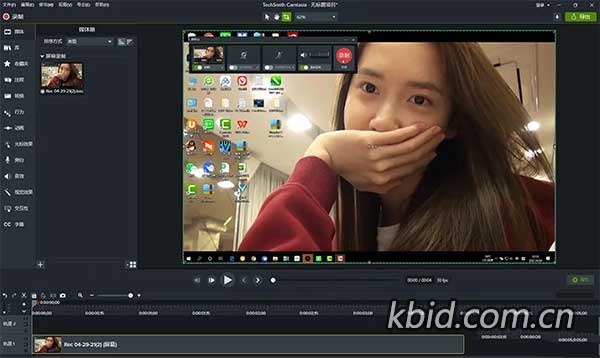
Start Creating Amazing Videos Today. Make professional-quality videos quickly and easily with Camtasia. Record your screen or upload an existing video, then bring the "Wow!" with effects, music, and much more.
Video software that works for you
Whether you make videos for marketing and sales, internal training, customer success, virtual or in-person learning, demonstrations, social media, or pretty much anything else, Camtasia helps make your vision a reality.
Inspire, educate, and excite your audience
We know that creating videos may seem like a daunting task, especially if you don't have any experience. That's why we created Camtasia – your all-in-one screen recorder and video editing solution. In virtually no time, you can create awesome videos that truly connect with your audience.
Educate
Sharing your knowledge has never been easier! Start by uploading a presentation or existing footage, then capture your screen, camera, and microphone to craft a pro-quality video that makes complex ideas simple, demonstrates a new process, trains people on a new skill, and much more.
Inspire
Ready to "WOW!" your audiences? Camtasia has everything you need to create incredible videos in record time. Easily add pop and pizazz to your videos with effects, transitions, music, and more. Best of all, they're incredibly easy to find, use, and customize, leaving you more time to create.
Excite
Keep your audience focused on the action with text, shapes, animations, and more. Zoom in to highlight details. Draw attention with a customized cursor. Add effects to transition ideas or just add some extra flair. The options are as limitless as your imagination!
Complete video projects up to 40% faster
A great video starts with great audio — and great audio starts with Audiate. Edit your voice over just like text and generate captions automatically. Plus, instantly remove hesitations and all those "ums" and "uhs." You can even edit your video as you edit your audio.
You can with Camtasia
Your video, your way. Camtasia's intuitive interface and drag-and-drop features help anyone create professional-quality video.
The world's most powerful screen recorder
Leave boring screen recordings behind. In addition to high-resolution screen capture, Camtasia records your microphone, system audio, camera, and cursor so you can edit them separately or all at once. Your editing will be faster and easier and the results will be incredible.
Camera
Capture your camera as you record to add personality to your videos. Position your camera video anywhere on the canvas.
Microphone
Great audio is an essential element to your video. Camtasia makes it easy to capture your microphone for crystal-clear voice over.
System Audio
Need to share the sounds generated by your software or computer? Now your viewers can hear what you hear.
Cursor Data
Your mouse cursor can help highlight important features or UX elements. Capture this data to make it easier to edit later.
Make your creative spark a wildfire
Sometimes, getting started on a new video can be intimidating. Fortunately, Camtasia offers hundreds of templates, assets, and text effects to help kindle your creative spark. Making professional looking videos has never been easier!
|
评论(55)
这种一体化工具对于小白来说门槛还是有点高啊。
其实跟着模板做几次就熟了,没那么吓人。
要是能直接识别方言就好了,不然还得手动改。
有一说一,做教程还是得靠它,别的软件时间轴太难用。
时间轴这块确实没得黑,拖拽很跟手。
自动字幕对普通话不标准的太友好了吧 😂
334MB?现在的安装包都这么精简了吗,有点不信。
之前搞过录屏,光标那个单独编辑功能确实省事儿。
光标编辑确实好用,以前手动调半天。
光标单独调太香了,剪教程省一半时间。
AI 降噪听着香,就怕把人气声也给抹没了。
这软件老版本就挺卡,新版真能变流畅?
老版本卡成 PPT,新版到底优化没?
老版本卡成PPT,这次真能起飞?
已全部加载完毕