|
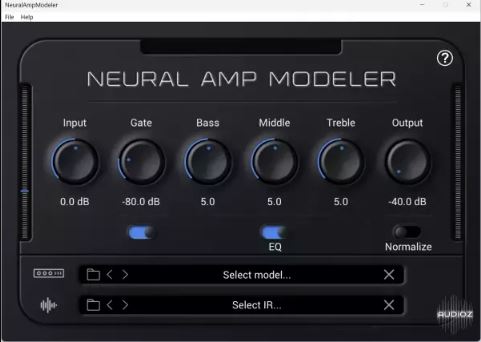
神经放大器建模器 (Neural Amp Modeler) 插件
一款基于 iPlug2 构建的神经放大器建模器 (Neural Amp Modeler) 的 VST3/AudioUnit 插件*。
https://www.youtube.com/user/RunawayThumbtack
https://github.com/sdatkinson/neural-amp-modeler
安装
查看版本信息,获取插件的预构建安装程序!
支持平台
神经放大器建模器 (Neural Amp Modeler) 插件目前支持 Windows 10(64 位)及更高版本,以及 macOS 10.15 (Catalina) 及更高版本。
对于 Linux 支持,您可以使用 LV2 插件:https://github.com/mikeoliphant/neural-amp-modeler-lv2。
关于
这是基于 iPlug2 的原始 NAM 插件的精简版本,并进行了一些重构,以采用 iPlug2 开发人员推荐的更好实践。 (感谢 Oli 的慷慨建议!)
* 很快也将支持 AAX、CLAP、Linux 和 iOS。
不足之处
独立 I/O
独立 I/O 的 I/O 不如大多数插件宿主(DAW)稳定,因此功能相对单一。最常见的不足之处是仅支持输入 1。如果您有一个双输入接口,吉他输入在输入 2(例如 Focusrite Solo),那么您需要 (A) 使用输入 1(或许还需要一个 DI 盒)或 (B) 在插件宿主中使用插件 (VST3/AU)。
图形后端
如果您在图形用户界面 (GUI) 出现之前遇到 NAM 崩溃的问题,那么您的图形配置可能不受支持。通常,这是因为您拥有独立显卡(例如 nVIDIA GPU),并且在 Windows 系统上使用集成显卡(CPU)。要解决此问题,请转到控制面板,选择 NAM(或您的 DAW),并确保它使用您的显卡。(如果您了解更多信息并能帮助解决此问题,请提交问题并告知我更多信息!)
Neural Amp Modeler Plug-in
A VST3/AudioUnit plug-in* for Neural Amp Modeler, built with iPlug2.
https://www.youtube.com/user/RunawayThumbtack
https://github.com/sdatkinson/neural-amp-modeler
Installation
Check the Releases for pre-built installers for the plugin!
Supported Platforms
The Neural Amp Modeler plugin currently supports Windows 10 (64bit) or later, and macOS 10.15 (Catalina) or later.
For Linux support, there is an LV2 plugin available: https://github.com/mikeoliphant/neural-amp-modeler-lv2.
About
This is a cleaned up version of the original iPlug2-based NAM plugin with some refactoring to adopt better practices recommended by the developers of iPlug2. (Thanks Oli for your generous suggestions!)
*could also support AAX, CLAP, Linux, iOS soon.
Rough edges
Standalone I/O
The I/O for the standalone doesn't inherit the stability of most plugin hosts (DAWs), so it's a bit sparser on features. The most common sharp edge is that only input 1 is supported. If you have a dual-input interface where the guitar goes in input 2 (e.g. Focusrite Solo), then you're going to need to either (A) use input 1 (and, perhaps, a DI box) or (B) use the plugin (VST3/AU) inside a plugin host.
Graphics backend
If you're having trouble with NAM crashing before the GUI comes up, then you might have an unsupported graphics configuration. Usually, this is when you have a dedicated graphics card (like an nVIDIA GPU) and you're using the integrated (CPU) graphics on a Windows system. To fix this, Go to the control panel, pick NAM (or your DAW), and make sure that it uses your graphics card. (If you know more and can help fix this, please make an Issue and let me know more!)
|

评论(5)
Focusrite Solo 用户表示输入口确实有点麻烦
13MB 的体积还能做这么高保真,挺厉害
有没有人试过在 Mac 上跑这个插件?
Win10 用独立显卡记得切换一下,不然会闪退
NAM 这音色模拟确实越来越像真箱了