
Yuri Semenov YS SaturDoub v1.0.1 是一款用于后期混音的音频处理插件,可融入常规混音流程,为音频素材的进一步调整与整体声音塑造提供辅助,适合在后期制作阶段按实际需求进行灵活处理。
支持系统:Windows.MAC |
音源厂商:https://www.positivegrid.com/products/bias-amp-2?variant=42604436258976 |
独立安装程序 PC + MAC |
文件大小:65MB |
 |
|---|
|
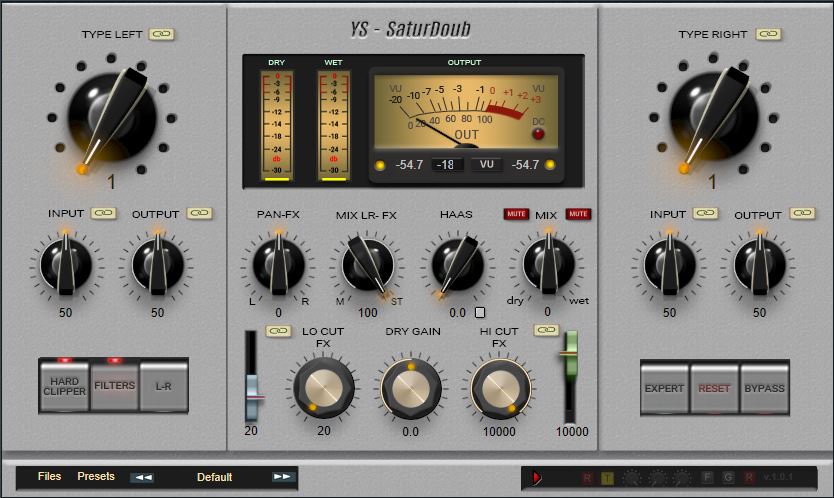
YS - SaturDoub_ 音频混音插件。这款插件专为喜欢通过形成音频波形来创建独特饱和算法,从而探索声音的人士打造。该插件为左右声道分别配备了两个独立的波形生成器,您可以创建任意失真公式,从轻度饱和到强烈的失真,满足各种喜好。十一个不同声道的选项组合,让您可以创建重复效果。此外,一个声道还带有延迟功能,可以创建哈斯效果。该插件与直通信号并联工作,并由单独的调节器进行混音。除了主插件之外,您还可以使用公式编辑器,直观地显示已编辑的波形。然后,只需复制波形,切换到专家模式即可将其粘贴到所需的单元格中。所有更改都可以保存到预设中。直通信号和效果器的截止滤波器默认关联,但您可以根据需要禁用关联并分别进行调整。该关联也适用于左右声道的每个参数。效果器可以切换到中侧模式,而直通信号将保持不变。 "Mix-LR" 控件将通道混合成单声道,如果添加延迟,则可以获得陷波滤波器效果以形成音调。输出端的硬限幅器始终处于开启状态,但您可以打开一个在其前带有软拐点的限幅器,这也会提供额外的饱和度。如果由于显卡性能较弱而导致某些控件无法显示,请将插件文件夹根目录中的图像替换为文件夹中 51 号较小的渲染器。默认情况下,所有元素都设置为使用 101 帧进行平滑切换。 YS - SaturDoub_ Audio plugin for mixing. Plugin for those who like to experiment with sound by creating unique saturation algorithms by forming an audio wave. The plugin has two independent wave formers for the left and right channels, where you can create any distortion formula. from light saturation to strong distortions for every taste. A combination of eleven options for different channels allows you to create a duplicate effect. There is also a delay in one channel to create the Haas effect. The plugin works in parallel connection to the direct signal and is mixed by a separate regulator. In addition to the main plugin, you can use the formula editor with a visual display of the edited waveform. Then, by simply copying it, it is pasted into the desired cell by switching to expert mode. All changes can be saved to a preset. Cutoff filters for the direct signal and effect are linked by default, but you can disable the link and adjust them separately if desired. The link also works for each parameter of the left and right channels. The effect can be switched to Mid-Side mode, while the direct signal will remain unaffected. The "Mix-LR" control mixes the channels in mono and if you add a delay, you can get a notch filter effect for tone formation. The hard clipper at the output is always on, but you can turn on a clipper with a soft knee before it, which will also give additional saturation. If some controls are not displayed due to a weak video card, then replace the images in the root of the plugin folder with a smaller renderer from folder 51. By default, all elements are set for smooth switching with frame 101. |
评论(7)
显卡弱还能换小渲染器,细节到位
自由度很高,能写自己想要的失真公式
软拐点限幅器给额外饱和,喜欢这个设计
中侧模式只影响湿信号吗?
并行处理加独立混音,这个思路挺好
哈斯效果直接内置了,省事
波形编辑器能自己画失真曲线,有意思