
Ircam Lab The Snail v1.4.2 实时调性分析器是一款由法国声学与音乐研究中心研发的专业音频插件,专为音乐制作人和声音设计师打造,能在DAW中实时解析音频信号的调性与和弦进行。与传统的调性分析工具不同,它采用基于听觉模型的算法,不仅能准确识别主调和调式(如大调、小调),还能动态跟踪转调与调性模糊段落,甚至区分自然、和声与旋律小调。例如,当你播放一段爵士钢琴即兴时,The Snail会即时显示调性中心、音阶候选及置信度,并以清晰的彩色渐变条或圆形谱图呈现。其低延迟处理(通常低于10毫秒)确保现场演奏或混音时不会产生可闻延迟,而可调的分析窗口(从短至50毫秒到长至数秒)则能灵活适配打击乐编排或慢速氛围音乐。此外,它支持MIDI输出,可将检测到的调性信息实时发送给其他乐器或效果器,实现自动和弦同步或音阶量化——比如让合成器琶音器自动跟随吉他扫弦的调性变化。无论是用于教学演示中的调性听觉训练,还是电子音乐中的智能和声生成,The Snail都以其精准与易用性成为现代音乐工作流中不可多得的实时助手。
支持系统:Windows |
音源厂商:https://www.ircamlab.com/products/p2242-The-Snail/ |
独立安装程序 PC |
文件大小:7MB |
 |
|---|
|
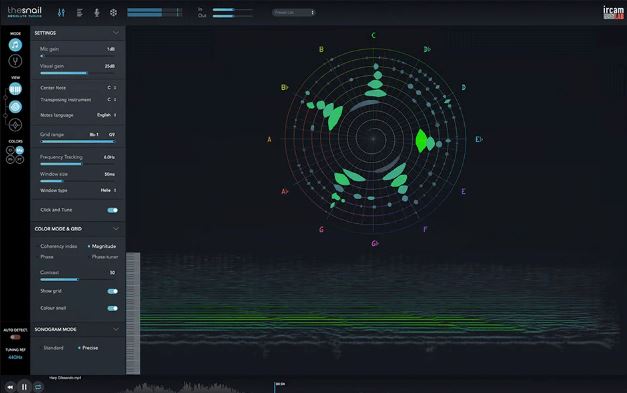
Snail 它提供 Mac 和 Windows 操作系统的独立应用程序,以及 AAX、AU 和 VST3 插件。 这款插件提供了一种极其精准的乐器调音和分析新方法。它显示音准,并以可视化的方式呈现音乐和声音,帮助任何人提升听力和音准! Snail 的内部工作原理包含两种模式和三种不同的显示视图: 模式: • 音乐模式 - 最适合查看包含复杂复音内容的音乐。 • 调音器模式 - 是帮助乐器调音的首选模式,因为它可以提高分析的分辨率。 显示视图: • 蜗牛视图 - 实时显示基频及所有相关谐波或泛音。 声音以"斑点"的形式呈现,沿着螺旋状的图形用户界面 (GUI) 从中心的低频到高频(及其相应的音符)依次向上。 • 缩放调音器视图 - 显示六边形,当您将参考频率归零至绿色时,该六边形会旋转并减慢速度。 此显示方式与传统调音器最为接近,但精度却更高。 • 声谱图视图 - 以更标准的方式(垂直方向)显示声谱随时间的变化,突出显示主要频率。 此视图提供更多频率能量细节,以供分析。 功能 The Snail It is available as a Standalone application for Mac and Windows OS, and AAX, AU and VST3 plug-in. This plug-in offers a new way of tuning and analyzing an instrument in an extremely accurate way. It displays the intonation and visualizes music and sounds in a way that can help anyone improve their listening and intonation! The inner workings of Snail comprises of two modes and three different display views : The Modes: • Music Mode - is the most suitable to view your music with, if for instance it contains complex polyphonic content. • Tuner Mode - is the preferred to help tune an instrument as it increases the resolution of the analysis. The Display Views: • Snail View - provides a representation of the fundamental frequencies and all related harmonics or overtones in real time. Sound is displayed as 'blobs' along a spiralled view from the low frequencies in the center to higher frequencies (and their respective musical notes) up the spiral GUI. • Zoomed Tuner View - displays the hexagonal shape which rotates and slows down as you zero down to green on the exact reference frequency. This display is the closest view to a traditional tuner while being incredibly more precise. • Sonogram View - offers a more standard representation of the sound spectrum over time (vertically), highlighting the prevailing frequencies. This view provides more detail of the frequencies' energy for analysis. Features |
评论(11)
MIDI输出能直接控制合成器的琶音器吗?
这玩意拿来扒和声估计省事不少
拿来抓走向确实方便
搞音频分析折腾过一阵子,这个实时性要是真能做到10ms以内就牛了
螺旋视图有点帅,但感觉真用起来会看晕
又是7MB的小工具,希望别太鸡肋🤔
支持M1芯片吗?win版延迟怎么样
之前玩过别的调性分析插件,这个螺旋视图挺新颖的
音乐模式看着挺香,就是不知道实际用起来卡不卡
已全部加载完毕