
iZotope RX 8 Audio Editor Advanced 是一款面向专业音频修复与后期制作场景的高级音频编辑软件,广泛应用于音乐制作、影视后期、广播节目、播客录制以及档案音频修复等领域。它以强大的频谱编辑能力著称,能够将声音以可视化方式呈现出来,让用户不仅可以“听见”问题,还可以“看见”问题,从而更精准地处理诸如底噪、爆音、口水声、齿音、电流声、混响过重以及环境干扰等常见音频瑕疵。Advanced 版本相比基础版本通常提供更完整的修复模块与更高效的工作流程,适合对音质要求极高的专业用户使用,无论是清理采访录音中的背景杂音,还是修复老旧录音中的损坏片段,都能显著提升处理效率与成品质量。同时,它还支持批量处理、模块链、自定义参数调整以及与主流音频工作站的协同配合,使用户能够在复杂项目中保持稳定、精细且高标准的音频修复体验。
支持系统:Windows.MAC |
音源厂商:https://www.izotope.com/ |
独立安装程序 PC + MAC |
文件大小:2.5GB |
 |
|---|
|
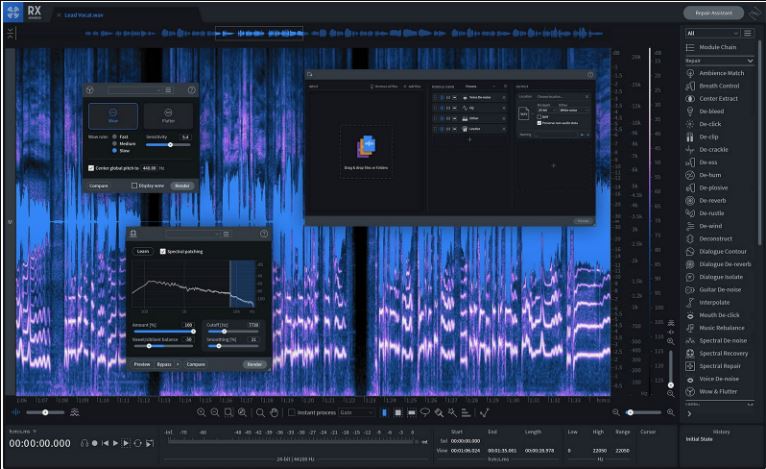
iZotope RX 8 Audio Software Review Recording at home is very convenient for musicians, but eliminating noise can be a pain. Most musicians spend and design their studios, which cost more than resorting to the software. Thankfully, the iZotope RX 8 Audio Software has a noise-reduction tool that eliminates most of the noise your audio has. It even improves the ambience depending on your preference. The iZotope RX 8 Audio Software is also a significant upgrade compared to the previous versions. It comes with a lot of audio modules that previous versions don't have. iZotope, Inc. has been around for quite a while now. Based in the United States, the company aims to deliver excellent software for audio recording, broadcasting, audio mixing, and sound design. They also specialise in audio technology. They're also well-known for software and technology licensing. It's because of their decade of experience in developing their tools and audio processing algorithms for their software. Table of Contents The more expensive versions contain more plug-ins, but the Elements version still operates similarly. If you're a guitarist, then you should opt for at least the Standard version. Since you're now mostly familiar with the product usage, let's move over to the Design and Functionality section of our iZotope RX 8 Audio Software review. iZotope RX 8 Audio Software Review – Design and Functionality 2020 11 19 11 57 26 iZotope RX 8 Advanced Audio Editor 05 Horizons.mp3 iZotope RX 8 Audio Software Review 2020 11 19 11 57 53 Reviews Latest in Tech iZotope RX 8 Audio Software Review 2020 11 19 11 58 12 iZotope RX 8 Advanced Audio Editor 05 Horizons.mp3 iZotope RX 8 Audio Software Review 2020 11 19 11 58 32 iZotope RX 8 Advanced Audio Editor 05 Horizons.mp3 iZotope RX 8 Audio Software Review 2020 11 19 11 56 00 iZotope RX 8 Advanced Audio Editor 05 Horizons.mp3 iZotope RX 8 Audio Software Review 2020 11 19 11 56 44 iZotope RX 8 Advanced Audio Editor 05 Horizons.mp3 iZotope RX 8 Audio Software Review 2020 11 19 11 56 56 iZotope RX 8 Advanced Audio Editor 05 Horizons.mp3 iZotope RX 8 Audio Software Review If you're coming from an older version of iZotope RX, the RX 8 is similar. Still, with added features. Audio engineers and video editors are sure to benefit, as this software is a complete package without needing to spend so much money on physical items/instruments. Instead of a single plug-in that includes all of the necessary tools, the iZotope RX 8 Audio Software installs dozens of individual AU, VST, and AAX. This is very convenient for those who had a lot of trouble with only a single plug-in. The iZotope RX 8 Audio Software also comes with improved features, which are Batch Processor and De-hum. What the Batch Processor does is it makes it easier to process a group of files. This is necessary if you're processing something, and you want to add a queue. For the De-hum feature, it now uses 16 frequency bands with a detailed audio spectrum analyser, which helps you attenuate any hums. Users can save more time and focus on their work since the User Interface is also easy to utilise. Navigation through the Waveform Overlay is fairly easy, simply because of the Horizontal Scrolling design. Key Features of the iZotope RX 8 Audio Software Horizontal Scrolling Spectrogram & Waveform Overlay Display Spectral Recovery Guitar De-noise User-Friendly Interface Live Preview & Comparison Proprietary File Format Digital Audio Workstation Integration Music Rebalance You can now also switch quality, preview, compare and bypass all at the same time before rendering. Loudness Control Wow & Flutter This Wow & Flutter also makes your audio crystal-clear and crispier since it automatically detects sonic anomalies and eliminates them. Module Chain Dialogue Isolate Overall, the features you get looks promising. However, most of these are only available for Standard and Advanced versions of RX 8. If you have the budget, you should consider opting for the more expensive ones. Now, let's go to the hands-on section of our iZotope RX 8 Audio Software review where we'll share our experiences with the software. iZotope RX 8 Audio Software Review Recording at home is very convenient for musicians, but eliminating noise can be a pain. Most musicians spend and design their studios, which cost more than resorting to the software. Thankfully, the iZotope RX 8 Audio Software has a noise-reduction tool that eliminates most of the noise your audio has. It even improves the ambience depending on your preference. The iZotope RX 8 Audio Software is also a significant upgrade compared to the previous versions. It comes with a lot of audio modules that previous versions don't have. iZotope, Inc. has been around for quite a while now. Based in the United States, the company aims to deliver excellent software for audio recording, broadcasting, audio mixing, and sound design. They also specialise in audio technology. They're also well-known for software and technology licensing. It's because of their decade of experience in developing their tools and audio processing algorithms for their software. Table of Contents The more expensive versions contain more plug-ins, but the Elements version still operates similarly. If you're a guitarist, then you should opt for at least the Standard version. Since you're now mostly familiar with the product usage, let's move over to the Design and Functionality section of our iZotope RX 8 Audio Software review. iZotope RX 8 Audio Software Review – Design and Functionality If you're coming from an older version of iZotope RX, the RX 8 is similar. Still, with added features. Audio engineers and video editors are sure to benefit, as this software is a complete package without needing to spend so much money on physical items/instruments. Instead of a single plug-in that includes all of the necessary tools, the iZotope RX 8 Audio Software installs dozens of individual AU, VST, and AAX. This is very convenient for those who had a lot of trouble with only a single plug-in. The iZotope RX 8 Audio Software also comes with improved features, which are Batch Processor and De-hum. What the Batch Processor does is it makes it easier to process a group of files. This is necessary if you're processing something, and you want to add a queue. For the De-hum feature, it now uses 16 frequency bands with a detailed audio spectrum analyser, which helps you attenuate any hums. Users can save more time and focus on their work since the User Interface is also easy to utilise. Navigation through the Waveform Overlay is fairly easy, simply because of the Horizontal Scrolling design. Key Features of the iZotope RX 8 Audio Software Horizontal Scrolling Spectrogram & Waveform Overlay Display Spectral Recovery Guitar De-noise User-Friendly Interface |
评论(16)
批量处理确实省命,素材一多真想砸键盘
那个Spectral Recovery对电话录音真有用?
口水声能处理这点对配音党太香了
999刀看着就心梗
修老录音这类活,RX基本绕不开了
看介绍挺猛,实际降太狠还是会有水声感吧😂
那个Guitar De-noise有人常用吗,担心把拨片质感也一起削没了
已全部加载完毕