|
Avid Sibelius是一款记谱软件,任何人都可以快速轻松地开始创作和分享音乐,从有抱负的作曲家和词曲作者到教师和学生。对于那些还不熟悉使用符号软件的人来说,直观的界面会引导您完成整个过程。磁性布局,防止物体相互碰撞,以及额外的节省时间的工具,使快速获得专业结果变得容易。
轻松创作音乐
Sibelius让音乐创作变得简单,让您可以使用电脑、iPad或iPhone在任何地方灵活工作。无论您是喜欢从屏幕上的记谱键盘、MIDI键盘、电脑键盘还是使用Apple Pencil输入音符,Sibelius都会为您处理所有音符布局、方向和休息细节。
构建作文
用多种乐器部件为从钢琴到管弦乐队的所有乐器创作音乐。不仅仅是音符和休息,你还可以添加和弦符号、吉他标签、吉他和弦图、表达文本、发音、歌词、标题、图形等,为你的音乐赋予应有的细节、深度和活力。你甚至可以循环播放来即兴发挥想法。
以惊人的细节聆听您的音乐
Sibelius包括一个高质量的样本库,里面装满了各种乐器,这样你就可以听到真正的音乐家演奏时你的音乐会是什么样子。您还可以插入第三方声音库,如NotePerformer,为您听到的乐器提供更大的灵活性。
快速排列零件
排列功能使从现有仪器中编排其他仪器零件变得容易。只需选择一种编排风格,Sibelius就会根据您的来源自动创建新的部分。您还可以在不同部分"爆炸"和弦,加快多部分乐器的演奏速度。或者通过单击将多个部分合并为一个。
获取智能导入
只需单击一下,您就可以将MIDI、MusicXML或Sibelius文件导入到新的或现有的乐谱中。所有的记谱、乐器、技巧和发音都是自动分配的,保留了作曲家的意图,为您节省了数小时甚至数天的清理时间。您甚至可以将多个分数组合在一起,并控制导入的内容。
完美和复习分数
Sibelius省去了调整仪器、调换零件和添加泥浆的手动工作,因此您可以更快地工作。当你的分数准备就绪时,复习模式允许你锁定内容,使合作者能够自由查看你的分数并添加评论和注释,而不必担心意外更改任何内容。
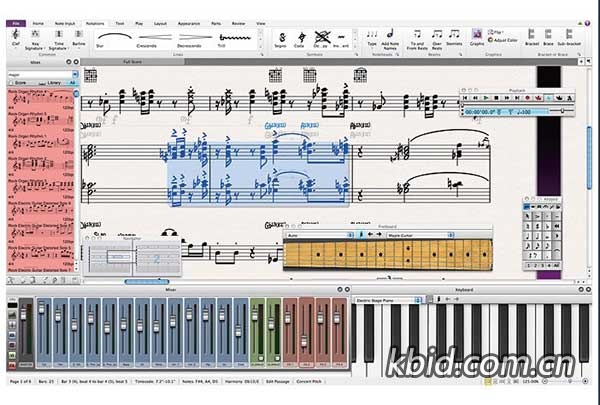
Avid Sibelius is notation software that is a fast and easy way for anyone to start writing and sharing music, from the aspiring composer and songwriter, to teachers and students. For those not yet comfortable with using notation software, the intuitive interface guides you through the process. Magnetic Layout, which keeps objects from bumping into each other, and additional time-saving tools make it easy to get professional results fast.
Write music with ease
Sibelius makes music composition easy, giving you the flexibility to work anywhere using your computer, iPad, or iPhone. Whether you prefer to enter notes from the onscreen notation Keypad, a MIDI keyboard, your computer keyboard, or using an Apple Pencil, Sibelius takes care of all note layout, orientation, and rest details for you.
Build up compositions
Create music for everything from piano to orchestra, with multiple instrument parts. And not just with notes and rests—you can add chord symbols, guitar tab, guitar chord diagrams, expression text, articulations, lyrics, titles, graphics, and more to give your music the detail, depth, and dynamism it deserves. You can even loop playback to improvise ideas.
Hear your music in stunning detail
Sibelius includes a high-quality sample library filled with a variety of musical instrumentation, so you can hear what your music will sound like when performed by real musicians. You can also plug in third-party sound libraries, such as NotePerformer, giving you more flexibility with the instrumentation you hear.
Arrange parts fast
The Arrange feature makes it easy to orchestrate additional instrument parts from existing ones. Simply select an orchestration style and Sibelius automatically creates new parts based on your sources. You can also "explode" chords across different parts, speeding up multipart instrumentation. Or consolidate multiple parts into one with a click.
Get Intelligent Import
With a single click, you can import a MIDI, MusicXML, or Sibelius file into a new or existing score. All notation, instrumentation, techniques, and articulations are automatically assigned, preserving the composer's intent and saving you hours—if not days—of clean-up time. You can even combine several scores together, with control over what's imported.
Perfect and review scores
Sibelius takes the manual effort out of adapting instrumentation, transposing parts, and adding slurs, so you can work faster. And when your score is ready, Review mode lets you lock things down, enabling collaborators to freely view your score and add comments and annotations without fear of accidentally changing anything.
|
评论(36)
听人说用破解版导出会有水印?真的假的
导出没水印,但更新可能失效
官方定价离谱,一顿饭钱都没有却要几千?
要是能像FL那样直接拖MIDI就爽了
NotePerformer插得进去,音色立马提升一档
磁性布局确实香,但Mac上偶尔抽风
之前搞过Sibelius,重装一次配置全乱,心累
重装后预设全丢,搞了半宿才恢复,太坑了。
求问这个无限试用真能持久吗?
这软件太贵了,学生党只能蹭试用版😂
几千块确实肉疼,够买把不错的吉他了。
已全部加载完毕