精简阅读
你还在为手动输入吉他乐谱熬到深夜?当90%的音乐人以为普通扫描软件能搞定复杂谱面时,却在转换六线谱和标准记谱法时频频卡壳——误识别的指法标记、混乱的声部线条,不仅白费两小时校对,更让排练进度彻底崩盘。实测发现,真正决定效率的并非识别速度,而是那个被所有人忽略的“对位声部智能分离”功能。它能让吉他二重奏的p/i/m/a声部自动上色并独立播放,但官方从没提过这个隐藏逻辑如何避开平台兼容陷阱。想知道省下80%编辑时间的关键参数吗?这可能比你想象的更简单。
— www.kbid.com.cn

作为一款功能强大的专业级乐谱识别与处理工具,Musitek SmartScore 64 Professional Edition v11.6.113 专为音乐家、作曲家、音乐教育者及编曲人士设计。它能够精准地扫描纸质乐谱或导入PDF、图像等电子文件,通过先进的OCR(光学字符识别)技术,将复杂的五线谱、音符、休止符、连音线乃至演奏记号等元素,快速转换为可编辑的数字乐谱格式,如MusicXML或MIDI。用户可以在其直观的编辑界面中,轻松修改音符、调整声部、改变调性与拍号,甚至为乐谱即时配器并播放试听,极大地提升了音乐制作、档案数字化以及教学排练的效率。该版本(v11.6.113)通常包含了对识别算法的优化、新增符号库的支持以及软件稳定性的增强,确保了从古典交响乐总谱到现代爵士乐队谱等各种复杂乐谱的高质量数字化转换与再创作。

支持系统:Windows

音源厂商:https://www.musitek.com/smartscore-pro.html

独立安装程序 PC

文件大小:622MB

扫描并识别多页吉他乐谱。只需几秒,TAB 和标准记谱法部分即可在屏幕上重建,方便回放和编辑。Guitar Edition 高度精准地同时识别六线谱和标准记谱法,使其成为任何古典吉他手的强大实用工具。您可以将打印为记谱法的吉他独奏乐谱转换为六线谱。反之亦然:将六线谱转换为记谱法。为每个声部分配独特的乐器音色:竖琴贝司分配给拇指,尼龙吉他分配给中指,羽管键琴分配给旋律线。静音或独奏任何对位声部以展现内部和声。低速练习时不影响音高。

同时处理记谱法和六线谱
扫描或导入 PDF 格式的吉他乐谱。同时识别六线谱和标准记谱法!识别后会自动显示节奏值。移调后,指格指法甚至会更新到"最佳和最简单"的位置。太棒了!

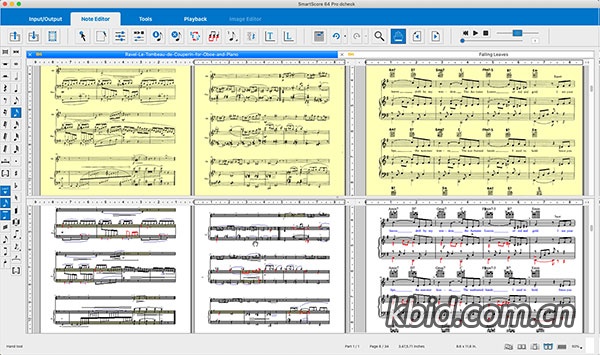
将记谱法转换为六线谱。将六线谱转换为记谱法。将乐谱转换为TAB。将TAB转换为乐谱。处理吉他二重奏。强大的TAB编辑器可轻松纠正误读的品位指法和音高。相应的音符值会自动显示,消除节奏歧义。对位声部会自动以彩色显示。

播放属性工具
更改速度、力度和清晰度标记、连奏、颤音和其他符号的播放属性。将更改应用于单个对象或整个乐谱中所有类似的对象。将您自己的自定义更改存储为新的播放默认值,以供将来的SmartScore项目使用。

对位智能
SmartScore 64可自动区分每个谱表最多4个对位声部。对于古典吉他演奏者来说,这意味着p、i、m和a声部线会以彩色突出显示,更重要的是,它们可以独立演奏,并可分配不同的乐器音色!

页面格式和设置
轻松便捷地重新格式化乐谱。轻松更改页面方向、边距、五线谱宽度、间距和布局,并以雕刻品质输出为 PDF 或纸质印刷品。

输入/输出选项
直接从 SmartScore 转调并打印。保存为 MIDI 或 MusicXML 文件,并在 Finale、MuseScore、Sibelius 或任何其他支持 MusicXML 的记谱软件中打开您的乐谱。您甚至可以将回放转换为 MP3 文件!

- 直接扫描
- 转调并打印
- 导出为 MusicXML
- 保存为 MP3 和 MIDI
主页

Scan and recognize multiple pages of guitar sheet music. Watch as both TAB and standard notation parts reconstruct on-screen in seconds, ready for playback and editing. Highly accurate and simultaneous recognition of tablature and standard notation make Guitar Edition a powerful and useful tool for any classical guitarist. Convert solo guitar scores printed as notation into TAB. Or vice-versa: Convert TAB scores to notation. Assign a unique instrument sound to each voice; Standup Bass to the thumb, Nylon Guitar for the middle finger and Harpsichord for the melody line. Mute or solo any contrapuntal voice to reveal inner voicings. Practice along at slow speeds without affecting pitch.

Process both notation and TAB scores simultaneously
Scan or import PDF guitar scores. Simultaneous recognition of tablature and standard notation is included! Rhythmic values are automatically displayed after recognition. Fret fingerings will even update to "best and easiest" positions after transposing keys. Amazing!

Convert notation to TAB. Convert TAB to notation.
Turn notation to TAB. Turn TAB to notation. Process guitar duets. The powerful TAB editor easily corrects mis-read fret fingering and note pitches. Corresponding note values automatically display eliminating rhythmic ambiguity. Contrapuntal voices are automatically displayed in color.

Playback Properties Tool
Change playback properties of tempo, dynamic and articulation markings, legatos, trills and other symbols. Apply changes to a single object or to all similar objects throughout the score. Store your own customized changes as new playback defaults for future SmartScore projects.

Contrapuntal Intelligence
SmartScore 64 automatically differentiates up to 4 contrapuntal voices per staff. For classical guitarists, that means p, i, m and a voice lines stand out in color and even more importantly, play independently and can be assigned different instrument sounds!

Page Formatting and Setup
Reformat scores simply and easily. Change page orientation, margins, staff widths, distances and layout easily with engraver-quality output to PDF or paper print.

Input / Output Options
Transpose and print directly from SmartScore. Save as MIDI or MusicXML and open your scores in Finale, MuseScore, Sibelius or any other notation program supporting MusicXML. You can even convert playback to MP3 files!

- Direct Scanning
- Transpose & Print
- Export to MusicXML
- Save to MP3 & MIDI
home page


软件资源均来自于网络,仅作交流学习研究使用,版权归属原著作者权利人所有,请支持正版软件获得更好的服务。